

Workspaces
Workspaces Overview
A Workspace is your home base in the DDx API Console — it's where you create and manage Apps, generate API keys, and control access to data.
Every user has a Personal Workspace, but most of the real work happens in Organizational Workspaces, which are shared by teams.
Types of Workspaces
Personal Workspace: Every account comes with one. It's private to you and can't be shared. Good for exploration, but not intended for production integrations.
Organizational Workspace: Shared across users within an organization. This is where production Apps, data access control, and API keys live.
Data Owners and Tech Partners
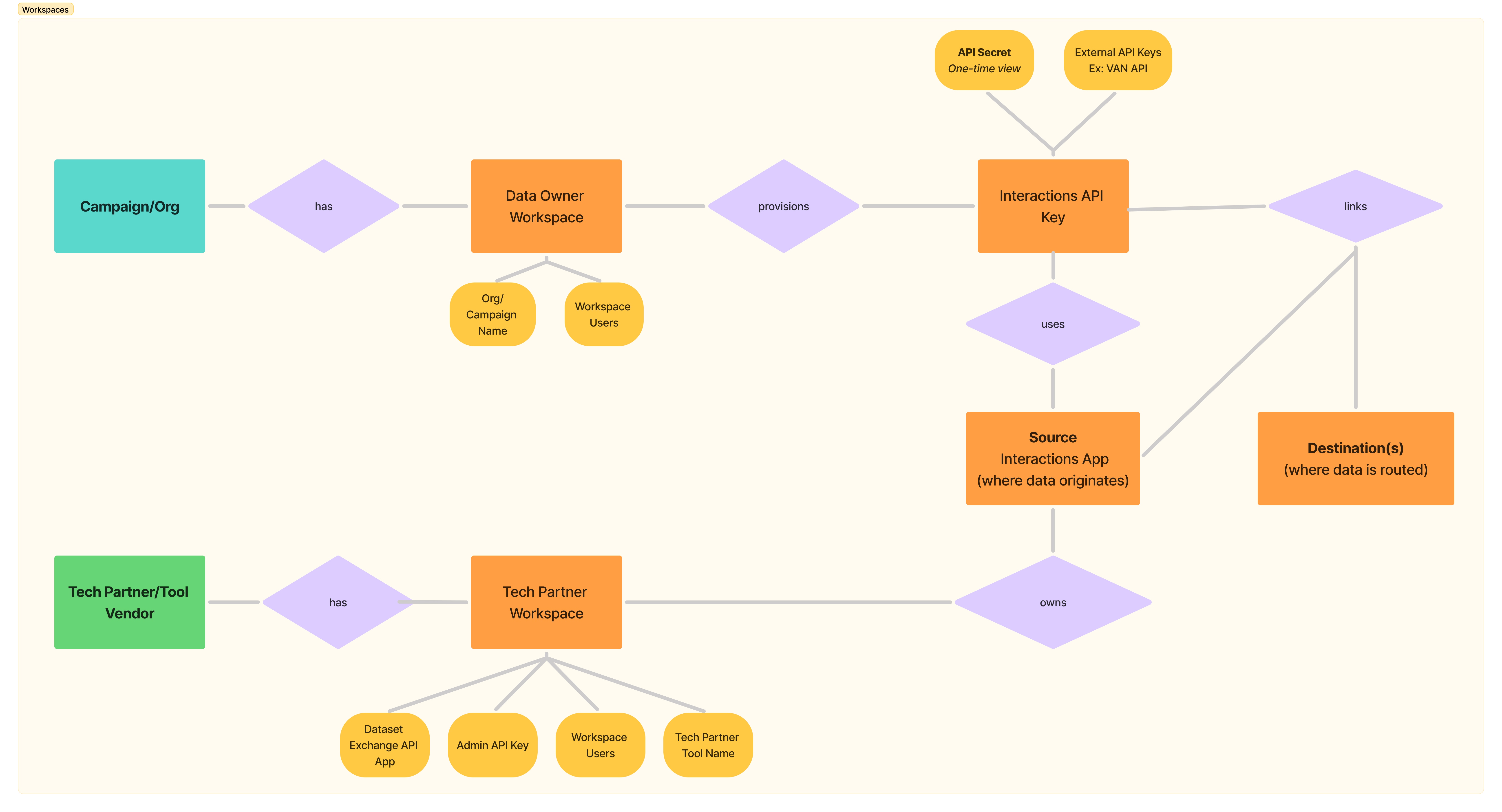
Data Owner and Tech Partner are the two ways an organization uses DDx, and most of these docs are written around them. A Data Owner is a campaign or organization whose data moves through DDx. A Tech Partner is a vendor or tool that integrates with DDx and moves that data on a Data Owner's behalf. The Interactions API expresses the same split by direction, as Sources and Destinations.
These are conceptual, not technical. Nothing in the platform tags a Workspace as one or the other, and an organization can be both. What the Console does have is a matching pair of dashboard views, Data Owner and Tech Partner, which change which tiles you see. You pick one on first sign-in and can switch at any time using the switcher next to the dashboard title. Switching views does not change what you are allowed to do; permissions come from your Workspace role, described in Workspace Role Definitions.
Workspaces have unique IDsEvery Workspace has a unique ID that travels with it — when data flows through the DDx APIs, data is tagged with a Workspace ID so it can be associated with the data owner in the downstream destination.
If you need to create or verify your team or your user has an Organizational Workspace, please contact us at [email protected]!
Technically there are only two Workspace types, Personal and Organizational. The two right-hand columns below are one Organizational Workspace used the two ways.
| Personal Workspace | Organizational Workspace as a Tech Partner | Organizational Workspace as a Data Owner | |
|---|---|---|---|
| Who it's for | Individual users | Vendors/Tools integrating with DDx APIs | Organizations that own and share data |
| Primary use | Exploration & testing | Create & manage Apps, test integrations, obtain API keys for your integration | Provision API keys to Tech Partner Apps, control access to bulk datasets |
| Owns Apps? | Development Apps only | Yes | Not typically! Some enterprise-level clients may create private Apps for moving data to internal data destinations or for doing basic testing |
| Shareable? | No | Yes | Yes |
Creating a Production App, and the API keys that go with it, requires an Organizational Workspace. See App Environments and Sharing Rules.
Workspace Relationships: Interactions API & API Keys
If you have questions about Workspaces, please contact us at [email protected]!
Updated about 2 months ago